

Metaphase Marketing
Meta Ads, Conversions API, CAPI, Server-Side Tracking, Lead Generation
The 2026 Technical Guide to Meta Conversions API (CAPI)

The 2026 Technical Guide to Meta Conversions API (CAPI): Gateway vs. sGTM vs. Direct API
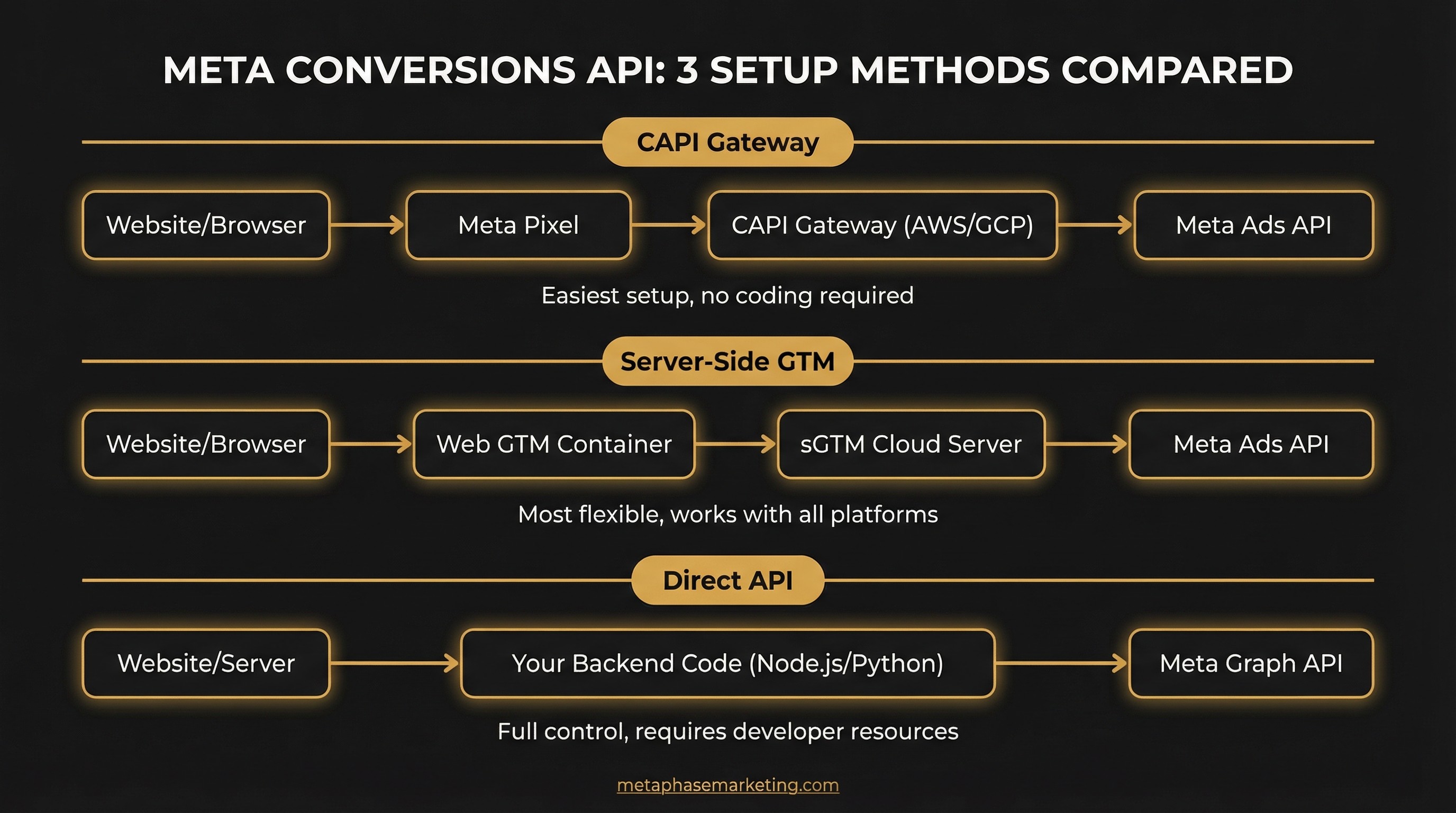
With the Meta Pixel now missing up to 60% of conversions due to privacy changes, implementing the Meta Conversions API (CAPI) is no longer optional. This guide provides a technical deep-dive into the three primary CAPI implementation methods, helping you choose the right architecture for your business.
Key Takeaways
Meta CAPI is a server-to-server integration that is immune to iOS ATT, ad blockers, and browser privacy features.
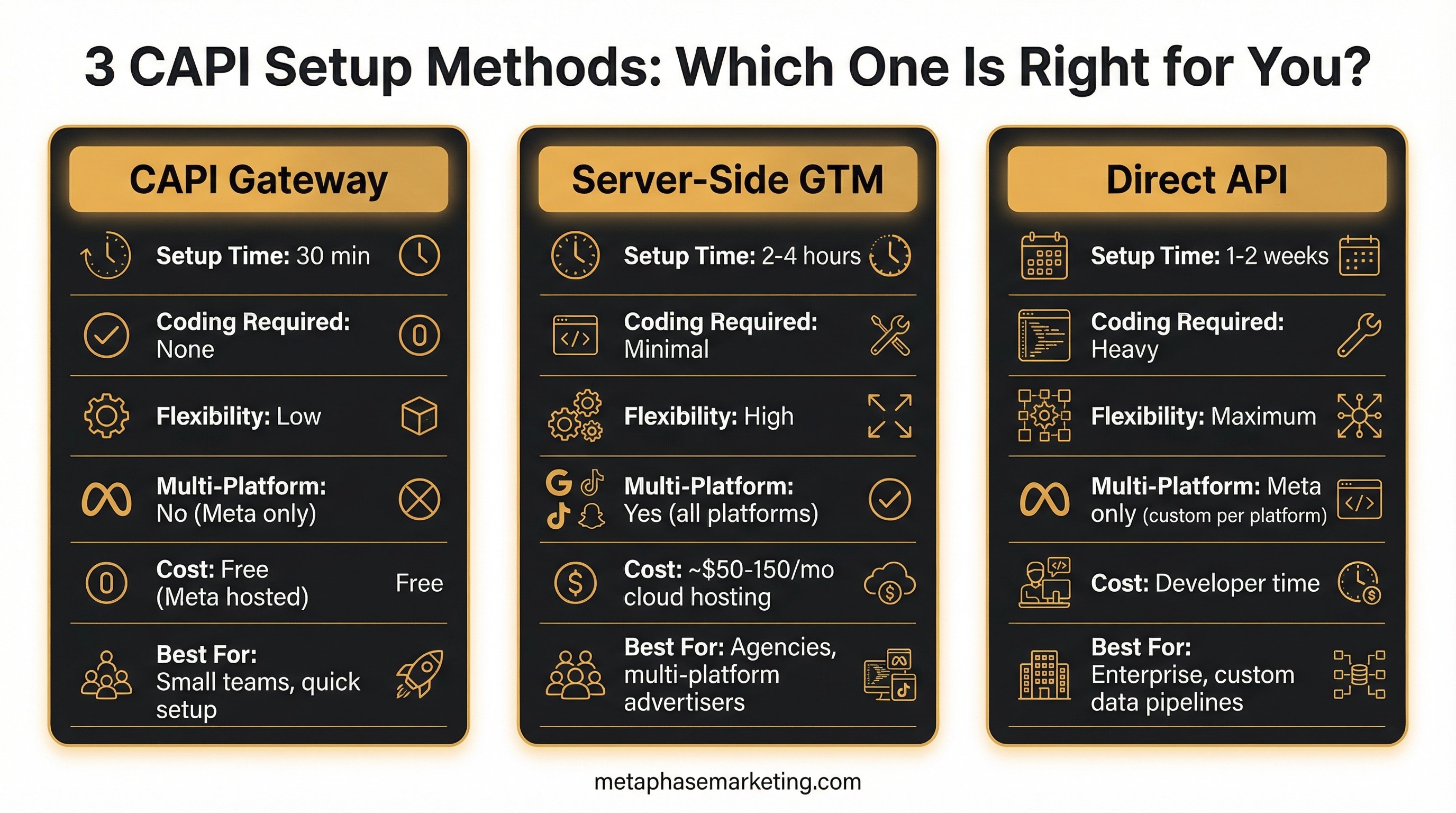
There are three main setup methods: CAPI Gateway (easy), Server-Side GTM (flexible), and Direct API (powerful).
Server-Side GTM offers the best balance of control and flexibility for most advertisers.
A dual tracking setup (Pixel + CAPI) with event deduplication is the recommended best practice.
Understanding the Core Problem: Pixel vs. Server
The Meta Pixel is a client-side JavaScript tag that is easily blocked by iOS ATT, ad blockers, and browser privacy features. CAPI is a server-to-server integration that is immune to these issues. Meta recommends a "dual tracking" setup, using both the Pixel and CAPI with event deduplication to achieve maximum data accuracy.
Method 1: CAPI Gateway - The Simple Path
The CAPI Gateway is a managed service that automatically creates server-side events to mirror your existing Pixel events. It is the fastest way to get started with server-side tracking.
How It Works
You deploy a CAPI Gateway instance (e.g., via Stape.io or a cloud provider). This instance listens for your Pixel events and sends a server-side copy to Meta. Deduplication is handled automatically by the Gateway.
When to Use It
Choose the Gateway if you are a Meta-only advertiser, have limited developer resources, and need a quick, reliable solution.
Method 2: Server-Side GTM (sGTM) - The Flexible Path
sGTM provides a server-side container where you can manage tags from multiple vendors (Meta, Google, TikTok). It offers the best balance of control and flexibility.
Example sGTM Setup for CAPI
Set up a Google Cloud Platform (GCP) project and deploy an sGTM container.
Configure your web GTM container to send data to your sGTM container using the GA4 tag.
In sGTM, install the "Facebook Conversions API" tag from the community template gallery.
Create a trigger for incoming GA4 events.
Configure the CAPI tag to fire on that trigger, mapping the GA4 event data to the corresponding Meta event parameters.
Method 3: Direct API Integration - The Power Path
This method involves sending events directly from your application's backend to the Meta Graph API. It offers the most control but requires custom development.
When to Use It
Choose the Direct API if you have a custom backend, need to send events that don't originate from your website (e.g., in-store purchases), or have strict data privacy requirements.
Example: Sending a Purchase Event with Node.js
Conclusion: Which Method is Right for You?
For most businesses, Server-Side GTM is the recommended approach. It provides the flexibility to manage multiple server-side tags while maintaining a high degree of control. The CAPI Gateway is a great starting point for smaller teams, while the Direct API is best reserved for enterprise-level custom data pipelines.










