Metaphase Marketing

Meta Ads, Conversions API, CAPI, Offline Conversions, Lead Generation, Server-Side Tracking

Meta Conversions API for Offline Lead Tracking: 2026 Setup Guide

In 2018, Meta introduced a separate Offline Conversions API , a tool specifically designed to send in-store purchases, phone orders, and CRM events back to the ad platform without a browser involved. It worked, and many agencies built integrations around it.

On May 14, 2025, Meta permanently shut it down.

Everything that used to flow through the Offline Conversions API now flows through the unified Conversions API (CAPI) , the same endpoint used for online events like web purchases and form submissions. If your integration relied on the old API, you either have a silent data gap right now or you have already been forced to rebuild.

This guide covers the current state of offline conversion tracking through Meta CAPI: why it matters, how to set it up from scratch, and the specific integration patterns Metaphase uses with real clients across e-commerce, healthcare, SaaS, and membership businesses.

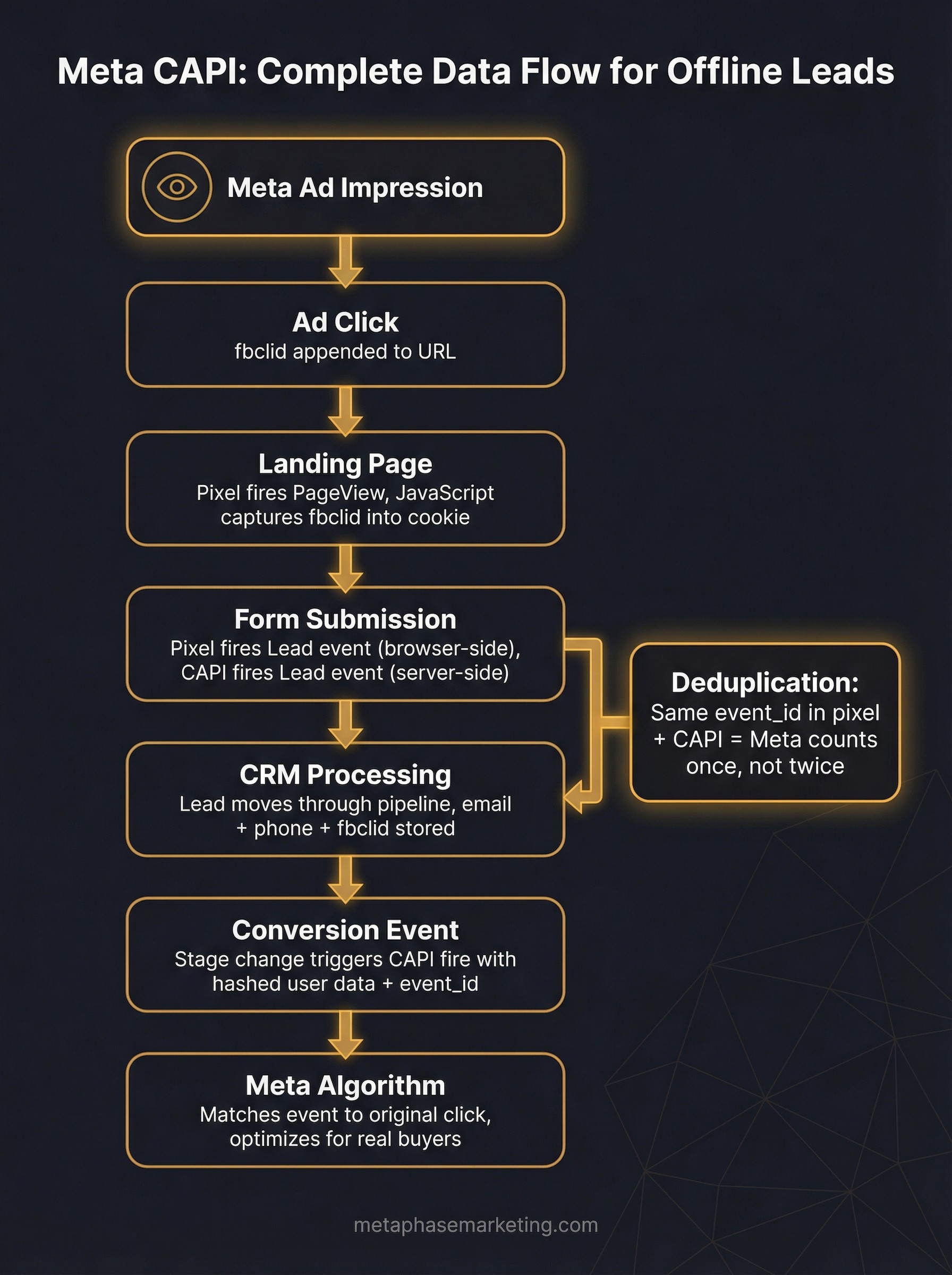
Meta CAPI complete data flow for offline leads showing seven steps from ad impression through fbclid capture to algorithm optimization with deduplication callout

Key Takeaways

  • Meta's standalone Offline Conversions API was permanently discontinued May 14, 2025. All offline events now use the Conversions API (CAPI).

  • Browser pixels miss 30–60% of actual conversions due to iOS privacy changes, ad blockers, and cross-device journeys. CAPI operates server-side and is unaffected by these restrictions.

  • Running both pixel and CAPI simultaneously , with proper deduplication via event_id , gives you the highest match rate and conversion coverage.

  • Capturing the fbclid parameter when a user clicks your Meta ad is critical for attribution accuracy. Store it in a cookie and pass it through your CRM.

  • The more user data fields you send (email, phone, name, IP, user agent), the higher your match quality score and the better Meta's algorithm can optimize.

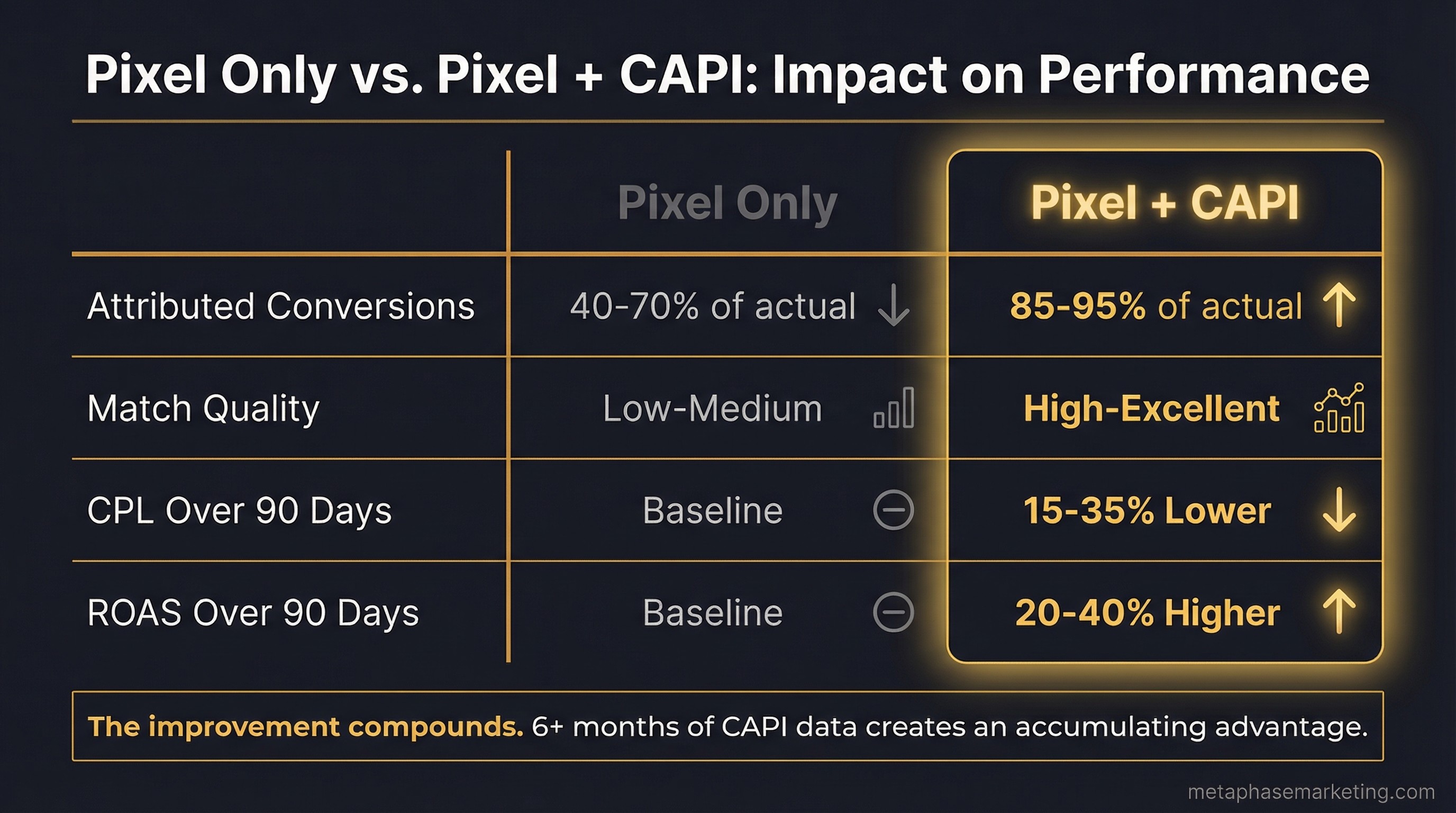
Pixel only versus Pixel plus CAPI performance comparison showing improvements in attributed conversions, match quality, CPL, and ROAS

Why the Browser Pixel Is No Longer Enough

The Meta pixel is still a useful tool. But in 2025, relying on it alone is like navigating with a map that has 30–60% of the roads missing.

Here is what the pixel cannot see:

  • iOS device events: Apple's App Tracking Transparency (ATT) framework requires users to opt in to tracking. The majority of iOS users have opted out, which means the pixel silently fails to fire , or fires without identity data that would allow attribution , across a large portion of iPhone traffic.

  • Ad-blocked sessions: An estimated 40%+ of desktop users run ad blockers. Many of these block pixel scripts from loading at all. No script, no event, no attribution.

  • Safari ITP: Safari's Intelligent Tracking Prevention caps third-party cookie lifetimes at 7 days, sometimes as low as 1 day. Cross-session attribution breaks for returning visitors on Safari.

  • Cross-device journeys: Someone clicks your Meta ad on their phone, then converts on their laptop later. The pixel sees two different people. CAPI can match both events back to the original ad click using hashed identity data.

  • Offline events: A phone call. An in-office appointment. A signed contract. A membership activation. There is no page load, no pixel fire. These events are completely invisible to browser-side tracking.

CAPI bypasses all of these problems. It fires from your server, not the user's browser. It cannot be blocked by ad blockers. iOS privacy settings do not affect it. It can send events that happen hours, days, or weeks after the original ad click , even events that never had a browser session at all.

Pixel vs. CAPI vs. Both

Setup

Accuracy

Setup Complexity

Best For

Pixel only

Low (30–60% data loss)

Easy

Starter campaigns only

CAPI only

High (no browser dependency)

Medium

Server-based or offline-heavy flows

Pixel + CAPI (redundant)

Highest (with deduplication)

Medium-High

All serious campaigns

The Metaphase standard is always to run both, always to deduplicate. The pixel provides real-time signals and gives you the event ID needed for deduplication. CAPI provides reliability, server-side accuracy, and the ability to send downstream events that the pixel would never see.

How CAPI Works: The Full Data Flow

Here is what happens from the moment a user sees your Meta ad to the moment CAPI fires:

  1. User sees your Meta ad on Facebook or Instagram.

  2. User clicks the ad. Meta appends a ?fbclid=XXXXXXX parameter to your destination URL.

  3. User lands on your website. Your browser pixel fires a PageView event. Your JavaScript captures the fbclid and stores it in a cookie.

  4. User fills out a form, makes a purchase, or books an appointment. The browser pixel fires a lead or purchase event in real time.

  5. Your CRM or billing system records the conversion event with all associated data , email, phone, the stored fbclid.

  6. Your server fires a CAPI event to Meta's endpoint with the hashed user data, the event name, a unique event_id, and the fbclid.

  7. Meta matches the CAPI event to the original ad click using the fbclid and hashed identity data. The algorithm learns from this real conversion signal.

For offline events , like a membership activation that happens in your booking software two weeks after the original click , steps four and five are replaced by your CRM or booking system triggering the CAPI fire directly, with no browser component at all.

Customer Matching Parameters

The quality of your CAPI integration is directly proportional to how much user data you send. Meta uses these fields to match your server-side event back to a specific user and their ad click history. The more fields you include, the higher your match quality score.

Parameter

Field Name

Hashing

Priority

Email

em

SHA-256, lowercase

Critical

Phone

ph

SHA-256, digits only

Critical

First name

fn

SHA-256, lowercase

High

Last name

ln

SHA-256, lowercase

High

ZIP code

zp

SHA-256, no spaces

Medium

City

ct

SHA-256, lowercase, no spaces

Medium

State

st

SHA-256, 2-letter code

Medium

Client IP address

client_ip_address

Plain text

High

User agent

client_user_agent

Plain text

High

fbc (click ID)

fbc

Plain text

High

fbp (browser ID)

fbp

Plain text

Medium

Always send as many parameters as you have. For offline events where you may not have the IP address or user agent (because there was no browser session), focus on sending email, phone, first name, last name, and the fbc value if it was captured at the original landing.

Step 1: Get Your Access Token

  1. Go to Meta Business Manager → Events Manager.

  2. Select your Pixel.

  3. Click Settings.

  4. Under "Conversions API," click Generate access token.

  5. Store this token as an environment variable on your server. Do not hardcode it in your source code or commit it to a repository.

Your Pixel ID is listed on the same settings page. You will need both the Pixel ID and the access token for every CAPI request.

Step 2: Set Up Deduplication

This is the most commonly skipped step, and skipping it causes real problems. If both your browser pixel and your CAPI integration fire for the same conversion event, Meta will count it twice , inflating your reported conversions and distorting your algorithm's signals.

The fix is simple: pass the same event_id in both the browser pixel call and the CAPI payload. Meta deduplicates automatically when it receives two events with the same event_id within a 48-hour window.

Browser pixel side:

fbq('track', 'Purchase', {
  value: 149.00,
  currency: 'USD',
}, {
  eventID: 'order_12345'  // must match the CAPI event_id below
});
fbq('track', 'Purchase', {
  value: 149.00,
  currency: 'USD',
}, {
  eventID: 'order_12345'  // must match the CAPI event_id below
});
fbq('track', 'Purchase', {
  value: 149.00,
  currency: 'USD',
}, {
  eventID: 'order_12345'  // must match the CAPI event_id below
});

CAPI side:

payload = {
    "data": [{
        "event_name": "Purchase",
        "event_id": "order_12345",   # same ID as the pixel call above
        "event_time": int(time.time()),
        "action_source": "website",
        "user_data": { ... },
        "custom_data": {
            "value": 149.00,
            "currency": "USD"
        }
    }]
}
payload = {
    "data": [{
        "event_name": "Purchase",
        "event_id": "order_12345",   # same ID as the pixel call above
        "event_time": int(time.time()),
        "action_source": "website",
        "user_data": { ... },
        "custom_data": {
            "value": 149.00,
            "currency": "USD"
        }
    }]
}
payload = {
    "data": [{
        "event_name": "Purchase",
        "event_id": "order_12345",   # same ID as the pixel call above
        "event_time": int(time.time()),
        "action_source": "website",
        "user_data": { ... },
        "custom_data": {
            "value": 149.00,
            "currency": "USD"
        }
    }]
}

The event_id should be a stable, unique identifier tied to the specific transaction , an order ID, booking ID, or a UUID generated at conversion time. Never use a timestamp alone as the event ID.

Step 3: Capture the fbclid

When a user clicks your Meta ad, the fbclid parameter is appended to your URL. You need to capture it immediately when the user lands on your page and store it for later use when CAPI fires.

function getCookieValue(name) {
  const match = document.cookie.match('(^|;)\\s*' + name + '\\s*=\\s*([^;]+)');
  return match ? match.pop() : '';
}

function storeFbclid() {
  const urlParams = new URLSearchParams(window.location.search);
  const fbclid = urlParams.get('fbclid');
  if (fbclid) {
    // Store for 90 days
    document.cookie = `fbclid=${fbclid}; max-age=${90*24*60*60}; path=/; SameSite=Lax`;
  }
}

storeFbclid();
function getCookieValue(name) {
  const match = document.cookie.match('(^|;)\\s*' + name + '\\s*=\\s*([^;]+)');
  return match ? match.pop() : '';
}

function storeFbclid() {
  const urlParams = new URLSearchParams(window.location.search);
  const fbclid = urlParams.get('fbclid');
  if (fbclid) {
    // Store for 90 days
    document.cookie = `fbclid=${fbclid}; max-age=${90*24*60*60}; path=/; SameSite=Lax`;
  }
}

storeFbclid();
function getCookieValue(name) {
  const match = document.cookie.match('(^|;)\\s*' + name + '\\s*=\\s*([^;]+)');
  return match ? match.pop() : '';
}

function storeFbclid() {
  const urlParams = new URLSearchParams(window.location.search);
  const fbclid = urlParams.get('fbclid');
  if (fbclid) {
    // Store for 90 days
    document.cookie = `fbclid=${fbclid}; max-age=${90*24*60*60}; path=/; SameSite=Lax`;
  }
}

storeFbclid();

When the user submits a form, pull the stored fbclid from the cookie and store it in your CRM against the lead record. When CAPI fires later, format it as fbc: fb.1.{unix_timestamp_ms}.{fbclid}.

Also capture the _fbp cookie value, which is set by the Meta pixel on page load. This provides a secondary matching signal when the fbclid is not available.

Step 4: Build the User Data Object

Here is a production-ready Python function for building the user_data dictionary with proper hashing:

import hashlib
import time
from typing import Optional

def hash_data(value: str) -> str:
    """SHA-256 hash for Meta user data fields."""
    return hashlib.sha256(value.strip().lower().encode()).hexdigest()

def build_user_data(
    email: Optional[str] = None,
    phone: Optional[str] = None,
    fbclid: Optional[str] = None,
    fbp: Optional[str] = None,
    ip_address: Optional[str] = None,
    user_agent: Optional[str] = None,
    first_name: Optional[str] = None,
    last_name: Optional[str] = None,
    zip_code: Optional[str] = None,
    city: Optional[str] = None,
    state: Optional[str] = None,
    country: str = "us"
) -> dict:
    user_data = {}

    if email:
        user_data["em"] = [hash_data(email)]
    if phone:
        # Strip all non-numeric characters before hashing
        clean_phone = ''.join(filter(str.isdigit, phone))
        user_data["ph"] = [hash_data(clean_phone)]
    if fbclid:
        # fbc format: fb.1.{unix_ms_timestamp}.{fbclid}
        user_data["fbc"] = f"fb.1.{int(time.time() * 1000)}.{fbclid}"
    if fbp:
        user_data["fbp"] = fbp
    if ip_address:
        user_data["client_ip_address"] = ip_address
    if user_agent:
        user_data["client_user_agent"] = user_agent
    if first_name:
        user_data["fn"] = [hash_data(first_name)]
    if last_name:
        user_data["ln"] = [hash_data(last_name)]
    if zip_code:
        user_data["zp"] = [hash_data(zip_code.replace(" ", ""))]
    if city:
        user_data["ct"] = [hash_data(city.replace(" ", "").lower())]
    if state:
        user_data["st"] = [hash_data(state.lower()[:2])]

    user_data["country"] = [hash_data(country)]

    return user_data
import hashlib
import time
from typing import Optional

def hash_data(value: str) -> str:
    """SHA-256 hash for Meta user data fields."""
    return hashlib.sha256(value.strip().lower().encode()).hexdigest()

def build_user_data(
    email: Optional[str] = None,
    phone: Optional[str] = None,
    fbclid: Optional[str] = None,
    fbp: Optional[str] = None,
    ip_address: Optional[str] = None,
    user_agent: Optional[str] = None,
    first_name: Optional[str] = None,
    last_name: Optional[str] = None,
    zip_code: Optional[str] = None,
    city: Optional[str] = None,
    state: Optional[str] = None,
    country: str = "us"
) -> dict:
    user_data = {}

    if email:
        user_data["em"] = [hash_data(email)]
    if phone:
        # Strip all non-numeric characters before hashing
        clean_phone = ''.join(filter(str.isdigit, phone))
        user_data["ph"] = [hash_data(clean_phone)]
    if fbclid:
        # fbc format: fb.1.{unix_ms_timestamp}.{fbclid}
        user_data["fbc"] = f"fb.1.{int(time.time() * 1000)}.{fbclid}"
    if fbp:
        user_data["fbp"] = fbp
    if ip_address:
        user_data["client_ip_address"] = ip_address
    if user_agent:
        user_data["client_user_agent"] = user_agent
    if first_name:
        user_data["fn"] = [hash_data(first_name)]
    if last_name:
        user_data["ln"] = [hash_data(last_name)]
    if zip_code:
        user_data["zp"] = [hash_data(zip_code.replace(" ", ""))]
    if city:
        user_data["ct"] = [hash_data(city.replace(" ", "").lower())]
    if state:
        user_data["st"] = [hash_data(state.lower()[:2])]

    user_data["country"] = [hash_data(country)]

    return user_data
import hashlib
import time
from typing import Optional

def hash_data(value: str) -> str:
    """SHA-256 hash for Meta user data fields."""
    return hashlib.sha256(value.strip().lower().encode()).hexdigest()

def build_user_data(
    email: Optional[str] = None,
    phone: Optional[str] = None,
    fbclid: Optional[str] = None,
    fbp: Optional[str] = None,
    ip_address: Optional[str] = None,
    user_agent: Optional[str] = None,
    first_name: Optional[str] = None,
    last_name: Optional[str] = None,
    zip_code: Optional[str] = None,
    city: Optional[str] = None,
    state: Optional[str] = None,
    country: str = "us"
) -> dict:
    user_data = {}

    if email:
        user_data["em"] = [hash_data(email)]
    if phone:
        # Strip all non-numeric characters before hashing
        clean_phone = ''.join(filter(str.isdigit, phone))
        user_data["ph"] = [hash_data(clean_phone)]
    if fbclid:
        # fbc format: fb.1.{unix_ms_timestamp}.{fbclid}
        user_data["fbc"] = f"fb.1.{int(time.time() * 1000)}.{fbclid}"
    if fbp:
        user_data["fbp"] = fbp
    if ip_address:
        user_data["client_ip_address"] = ip_address
    if user_agent:
        user_data["client_user_agent"] = user_agent
    if first_name:
        user_data["fn"] = [hash_data(first_name)]
    if last_name:
        user_data["ln"] = [hash_data(last_name)]
    if zip_code:
        user_data["zp"] = [hash_data(zip_code.replace(" ", ""))]
    if city:
        user_data["ct"] = [hash_data(city.replace(" ", "").lower())]
    if state:
        user_data["st"] = [hash_data(state.lower()[:2])]

    user_data["country"] = [hash_data(country)]

    return user_data

Step 5: Send the CAPI Event

Here is the full CAPI fire function , the one Metaphase uses in production across client integrations:

import hashlib, json, time, urllib.request, urllib.error
import re

PIXEL_ID = "YOUR_PIXEL_ID"
ACCESS_TOKEN = "YOUR_CAPI_ACCESS_TOKEN"
API_URL = f"https://graph.facebook.com/v19.0/{PIXEL_ID}/events"

def sha256(value: str) -> str:
    if not value:
        return ""
    return hashlib.sha256(value.strip().lower().encode()).hexdigest()

def clean_phone(phone: str) -> str:
    return re.sub(r"[^\d]", "", phone)

def fire_meta_capi(
    event_name: str,
    event_id: str,
    email: str = "",
    phone: str = "",
    first_name: str = "",
    last_name: str = "",
    value: float = 0.0,
    currency: str = "USD",
    custom_data: dict = None,
    action_source: str = "website"
):
    user_data = {}
    if email:
        user_data["em"] = sha256(email)
    if phone:
        user_data["ph"] = sha256(clean_phone(phone))
    if first_name:
        user_data["fn"] = sha256(first_name)
    if last_name:
        user_data["ln"] = sha256(last_name)

    event = {
        "event_name": event_name,
        "event_time": int(time.time()),
        "event_id": event_id,
        "action_source": action_source,
        "user_data": user_data,
        "custom_data": {
            "value": value,
            "currency": currency,
            **(custom_data or {})
        }
    }

    payload = json.dumps({"data": [event]}).encode()
    req = urllib.request.Request(
        f"{API_URL}?access_token={ACCESS_TOKEN}",
        data=payload,
        headers={"Content-Type": "application/json"},
        method="POST"
    )
    try:
        resp = json.loads(urllib.request.urlopen(req, timeout=10).read())
        print(f"CAPI fired: {event_name} | events_received={resp.get('events_received')} | id={event_id}")
        return resp
    except urllib.error.HTTPError as e:
        print(f"CAPI error: {e.code} {e.read().decode()}")
        raise
import hashlib, json, time, urllib.request, urllib.error
import re

PIXEL_ID = "YOUR_PIXEL_ID"
ACCESS_TOKEN = "YOUR_CAPI_ACCESS_TOKEN"
API_URL = f"https://graph.facebook.com/v19.0/{PIXEL_ID}/events"

def sha256(value: str) -> str:
    if not value:
        return ""
    return hashlib.sha256(value.strip().lower().encode()).hexdigest()

def clean_phone(phone: str) -> str:
    return re.sub(r"[^\d]", "", phone)

def fire_meta_capi(
    event_name: str,
    event_id: str,
    email: str = "",
    phone: str = "",
    first_name: str = "",
    last_name: str = "",
    value: float = 0.0,
    currency: str = "USD",
    custom_data: dict = None,
    action_source: str = "website"
):
    user_data = {}
    if email:
        user_data["em"] = sha256(email)
    if phone:
        user_data["ph"] = sha256(clean_phone(phone))
    if first_name:
        user_data["fn"] = sha256(first_name)
    if last_name:
        user_data["ln"] = sha256(last_name)

    event = {
        "event_name": event_name,
        "event_time": int(time.time()),
        "event_id": event_id,
        "action_source": action_source,
        "user_data": user_data,
        "custom_data": {
            "value": value,
            "currency": currency,
            **(custom_data or {})
        }
    }

    payload = json.dumps({"data": [event]}).encode()
    req = urllib.request.Request(
        f"{API_URL}?access_token={ACCESS_TOKEN}",
        data=payload,
        headers={"Content-Type": "application/json"},
        method="POST"
    )
    try:
        resp = json.loads(urllib.request.urlopen(req, timeout=10).read())
        print(f"CAPI fired: {event_name} | events_received={resp.get('events_received')} | id={event_id}")
        return resp
    except urllib.error.HTTPError as e:
        print(f"CAPI error: {e.code} {e.read().decode()}")
        raise
import hashlib, json, time, urllib.request, urllib.error
import re

PIXEL_ID = "YOUR_PIXEL_ID"
ACCESS_TOKEN = "YOUR_CAPI_ACCESS_TOKEN"
API_URL = f"https://graph.facebook.com/v19.0/{PIXEL_ID}/events"

def sha256(value: str) -> str:
    if not value:
        return ""
    return hashlib.sha256(value.strip().lower().encode()).hexdigest()

def clean_phone(phone: str) -> str:
    return re.sub(r"[^\d]", "", phone)

def fire_meta_capi(
    event_name: str,
    event_id: str,
    email: str = "",
    phone: str = "",
    first_name: str = "",
    last_name: str = "",
    value: float = 0.0,
    currency: str = "USD",
    custom_data: dict = None,
    action_source: str = "website"
):
    user_data = {}
    if email:
        user_data["em"] = sha256(email)
    if phone:
        user_data["ph"] = sha256(clean_phone(phone))
    if first_name:
        user_data["fn"] = sha256(first_name)
    if last_name:
        user_data["ln"] = sha256(last_name)

    event = {
        "event_name": event_name,
        "event_time": int(time.time()),
        "event_id": event_id,
        "action_source": action_source,
        "user_data": user_data,
        "custom_data": {
            "value": value,
            "currency": currency,
            **(custom_data or {})
        }
    }

    payload = json.dumps({"data": [event]}).encode()
    req = urllib.request.Request(
        f"{API_URL}?access_token={ACCESS_TOKEN}",
        data=payload,
        headers={"Content-Type": "application/json"},
        method="POST"
    )
    try:
        resp = json.loads(urllib.request.urlopen(req, timeout=10).read())
        print(f"CAPI fired: {event_name} | events_received={resp.get('events_received')} | id={event_id}")
        return resp
    except urllib.error.HTTPError as e:
        print(f"CAPI error: {e.code} {e.read().decode()}")
        raise

Event Types Reference

Use the standard Meta event names wherever possible. They are pre-configured for optimization objectives and work automatically with Meta's algorithm signals.

Event Name

When to Fire

Key Custom Data Fields

Lead

Form submission, consultation request, call booked

lead_id, lead_type

CompleteRegistration

Account created, patient registration

registration_id

Schedule

Appointment booked

appointment_id, service_type

Purchase

Payment confirmed, membership activated

value, currency, order_id

StartTrial

Free trial started

trial_id, plan_type

Subscribe

Recurring subscription activated

subscription_id, plan_type

Contact

Phone call, live chat, direct inquiry

contact_method

For events that do not map cleanly to a standard event name, use a custom event name (for example, TreatmentCompleted or ContractSigned) and then create a Custom Conversion in Meta Events Manager to track and optimize for it.

Real Integration Patterns

Pattern 1: Stripe Webhook → CAPI Purchase

This is the pattern Metaphase uses for SaaS clients and e-commerce accounts. When a Stripe payment completes, Stripe fires a checkout.session.completed webhook to your server endpoint. Your handler then fires CAPI with the Stripe session ID as the event_id.

def handle_stripe_webhook(payload: dict):
    session = payload["data"]["object"]
    customer_email = session.get("customer_details", {}).get("email", "")
    amount = session["amount_total"] / 100  # Stripe stores amounts in cents

    fire_meta_capi(
        event_name="Purchase",
        event_id=session["id"],  # Stripe session ID = guaranteed unique dedup key
        email=customer_email,
        value=amount,
        currency=session["currency"].upper()
    )
def handle_stripe_webhook(payload: dict):
    session = payload["data"]["object"]
    customer_email = session.get("customer_details", {}).get("email", "")
    amount = session["amount_total"] / 100  # Stripe stores amounts in cents

    fire_meta_capi(
        event_name="Purchase",
        event_id=session["id"],  # Stripe session ID = guaranteed unique dedup key
        email=customer_email,
        value=amount,
        currency=session["currency"].upper()
    )
def handle_stripe_webhook(payload: dict):
    session = payload["data"]["object"]
    customer_email = session.get("customer_details", {}).get("email", "")
    amount = session["amount_total"] / 100  # Stripe stores amounts in cents

    fire_meta_capi(
        event_name="Purchase",
        event_id=session["id"],  # Stripe session ID = guaranteed unique dedup key
        email=customer_email,
        value=amount,
        currency=session["currency"].upper()
    )

Pattern 2: HubSpot Deal → CAPI Lead Event

For B2B clients using HubSpot, a cron job runs every two minutes, queries HubSpot for new deals created since the last run, and fires a CAPI Lead event for each one. This is the pattern Metaphase uses for its own client acquisition campaigns.

def sync_hubspot_leads():
    deals = get_new_hubspot_deals(since=last_run_timestamp)
    for deal in deals:
        fire_meta_capi(
            event_name="Lead",
            event_id=f"hs_deal_{deal['id']}",  # HubSpot deal ID as dedup key
            email=deal.get("email", ""),
            value=0,
            currency="USD"
        )
def sync_hubspot_leads():
    deals = get_new_hubspot_deals(since=last_run_timestamp)
    for deal in deals:
        fire_meta_capi(
            event_name="Lead",
            event_id=f"hs_deal_{deal['id']}",  # HubSpot deal ID as dedup key
            email=deal.get("email", ""),
            value=0,
            currency="USD"
        )
def sync_hubspot_leads():
    deals = get_new_hubspot_deals(since=last_run_timestamp)
    for deal in deals:
        fire_meta_capi(
            event_name="Lead",
            event_id=f"hs_deal_{deal['id']}",  # HubSpot deal ID as dedup key
            email=deal.get("email", ""),
            value=0,
            currency="USD"
        )

Pattern 3: Booking Software → CAPI Subscribe

For med spa and membership businesses, the real conversion is not a form fill , it is a membership activation in the booking software. Here is how Metaphase wires Boulevard to CAPI, including location-level segmentation via custom data:

def handle_blvd_membership(payload: dict):
    lead = payload.get("data", {}).get("client", {})
    location = payload["data"].get("locationName", "unknown").lower()

    fire_meta_capi(
        event_name="Purchase",
        event_id=payload["id"],
        email=lead.get("email", ""),
        phone=lead.get("mobilePhone", ""),
        first_name=lead.get("firstName", ""),
        last_name=lead.get("lastName", ""),
        value=149.00,
        currency="USD",
        custom_data={
            "content_type": "membership",
            "content_name": "New Member",
            "location": location  # "dallas" or "southlake"
        }
    )
def handle_blvd_membership(payload: dict):
    lead = payload.get("data", {}).get("client", {})
    location = payload["data"].get("locationName", "unknown").lower()

    fire_meta_capi(
        event_name="Purchase",
        event_id=payload["id"],
        email=lead.get("email", ""),
        phone=lead.get("mobilePhone", ""),
        first_name=lead.get("firstName", ""),
        last_name=lead.get("lastName", ""),
        value=149.00,
        currency="USD",
        custom_data={
            "content_type": "membership",
            "content_name": "New Member",
            "location": location  # "dallas" or "southlake"
        }
    )
def handle_blvd_membership(payload: dict):
    lead = payload.get("data", {}).get("client", {})
    location = payload["data"].get("locationName", "unknown").lower()

    fire_meta_capi(
        event_name="Purchase",
        event_id=payload["id"],
        email=lead.get("email", ""),
        phone=lead.get("mobilePhone", ""),
        first_name=lead.get("firstName", ""),
        last_name=lead.get("lastName", ""),
        value=149.00,
        currency="USD",
        custom_data={
            "content_type": "membership",
            "content_name": "New Member",
            "location": location  # "dallas" or "southlake"
        }
    )

In Meta Events Manager, you then create a custom conversion: Purchase where content_type contains "membership." This gives you the ability to optimize individual ad sets toward location-specific membership signups and build lookalike audiences from actual members rather than all website visitors.

Custom Conversions for Segmentation

Standard events like Purchase are broad. If your business has multiple product lines, locations, or customer segments, custom conversions let you create optimizable signals at a much more granular level.

To create a custom conversion:

  1. In Meta Events Manager, go to Custom Conversions → Create.

  2. Select the base event (e.g., Purchase).

  3. Add a rule: content_type contains membership.

  4. Name it descriptively: "New Member , Dallas."

  5. Repeat for each variant (Southlake, online, etc.).

This allows you to optimize separate ad sets toward each segment, see true cost per acquisition by product or location, and build segment-specific lookalike audiences.

Step 6: Validate with the Test Events Tool

Before going live with real traffic, validate your integration using Meta's Test Events tool:

  1. Go to Events Manager → Your Pixel → Test Events.

  2. Click Test Server Events.

  3. Send a test payload from your server to the CAPI endpoint.

  4. Confirm the event appears in the Test Events panel within 60 seconds.

  5. Check the Match quality score , aim for 7 or higher out of 10.

Also send a simultaneous pixel event with the same event_id to verify deduplication is working. You should see exactly one event in the Test Events panel, not two.

Use the Payload Helper tool in Events Manager to verify your hashing format before sending live traffic. Incorrect hashing is the most common cause of poor match quality scores.

Troubleshooting

Events not appearing in Events Manager:

  • Check that your access token is valid and has not expired.

  • Verify the Pixel ID in your API URL is correct.

  • Confirm event_time is a Unix timestamp within the last 7 days.

Match quality score is Poor:

  • Add more user data fields , phone and name in addition to email make a significant difference.

  • Confirm phone number is digits-only before hashing (no dashes, no parentheses, no country code).

  • Confirm email is lowercase before hashing.

  • Check that you are including fbc when it is available.

Duplicate events appearing:

  • Verify the event_id is identical in both the pixel call and the CAPI payload.

  • Check whether you are sending batched events more than 48 hours after the original browser event , outside the dedup window, duplicates will not be caught automatically.

CAPI fires but conversions are not attributed:

  • Check that action_source is set to "website" for web-originated events and "system_generated" for events that originated in a CRM or server-only context with no browser session.

  • Verify that your attribution window settings in Meta Ads Manager match your customer journey length. If your customers typically convert 10 days after clicking, a 7-day click window will miss them.

Expected Impact

Based on Metaphase client results and industry benchmarks:

Metric

Pixel Only

Pixel + CAPI

Attributed conversions

40–70% of actual

85–95% of actual

Match quality

Low-Medium

High-Excellent

CPL over 90 days

Baseline

15–35% lower

ROAS over 90 days

Baseline

20–40% higher

The improvement compounds. Meta's algorithm improves as it receives cleaner signals. Accounts with 6+ months of CAPI data consistently outperform pixel-only accounts , not because the ads are better, but because the algorithm knows what a real buyer looks like.

Need Help Wiring This Up?

Metaphase builds the server-side infrastructure that connects your Meta campaigns to real revenue. We typically get Tier 2 implementations live in 3–5 business days , CAPI wired, deduplication verified, match quality confirmed.


See how we approach Meta Ads →

Book a consultation

Available

Metaphase Marketing

Working Hours ( CST )

8am to 8pm

Available

Metaphase Marketing

Working Hours ( CST )

8am to 8pm

👇 Have a question? Ask below 👇

👇 Have a question? Ask below 👇

METAPHASE MARKETING

X Logo
Instagram Logo
Linkedin Logo

Let’s work together

© 2024 Metaphase Marketing. All rights reserved.

METAPHASE MARKETING


X Logo
Instagram Logo
Linkedin Logo

Let’s work together

© 2024 Metaphase Marketing. All rights reserved.

METAPHASE MARKETING

X Logo
Instagram Logo
Linkedin Logo

Let’s work together

© 2024 Metaphase Marketing. All rights reserved.