

Metaphase Marketing
Attribution, B2B Marketing, Lead Generation, Google Ads, Meta Ads, Offline Conversions
Full-Funnel Attribution for B2B Lead Generation

Cost per lead is a vanity metric. It looks like performance data, but it is not. A $30 CPL means nothing if 2% of those leads close. A $150 CPL means nothing if 40% close at $8,000 average deal size. The number that actually matters , cost per acquisition at revenue value , requires a completely different infrastructure to measure.
Most agencies do not build that infrastructure. They set up a pixel, count form fills, and report CPL. The client approves the campaigns based on CPL, the sales team works leads of inconsistent quality, and neither side ever knows whether the $15,000 monthly ad spend is generating $90,000 in revenue or $25,000.
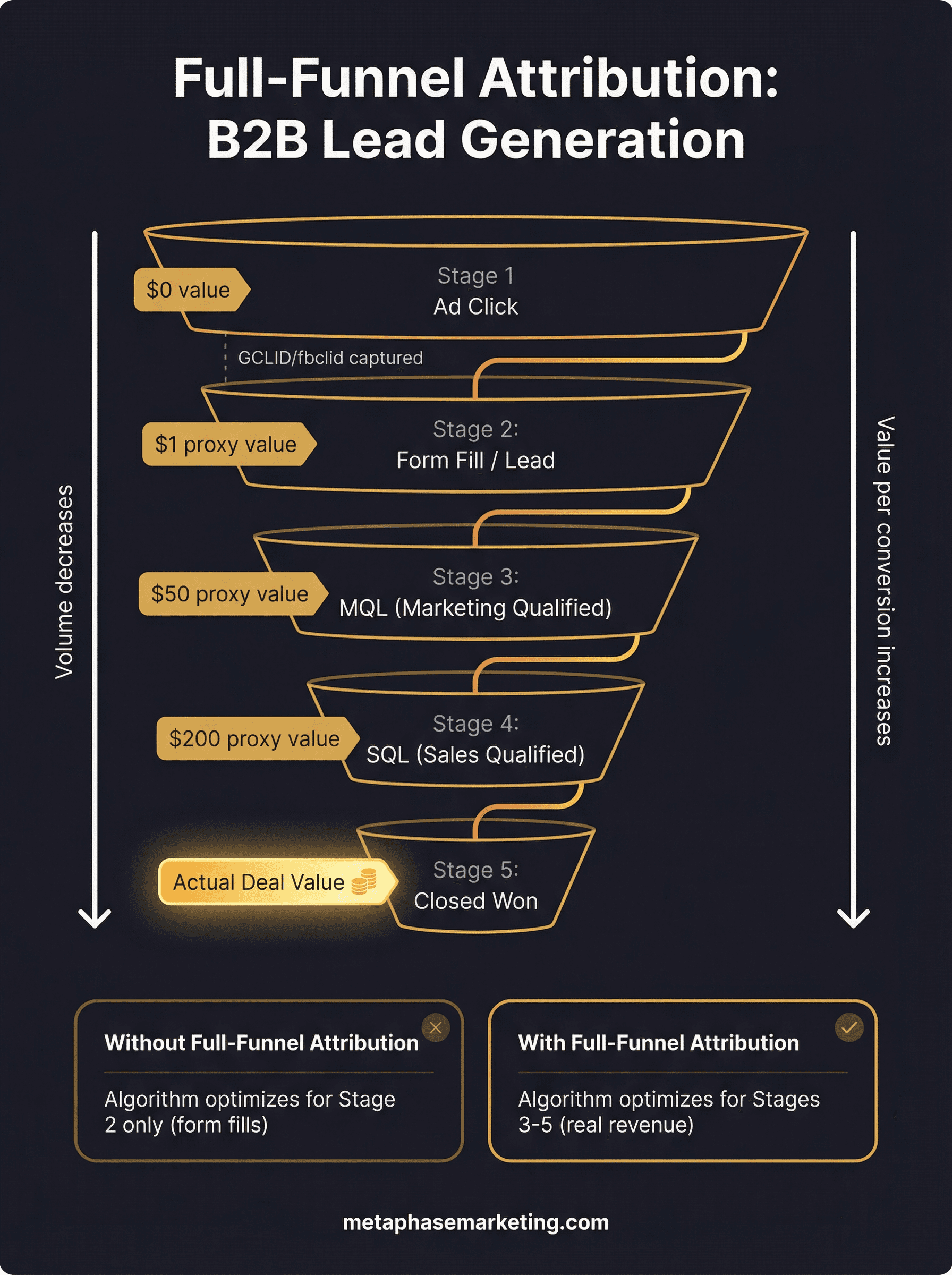
Full-funnel attribution closes this gap. It connects the original ad click , the keyword someone searched, the Facebook post they saw, the audience segment they belonged to , all the way through to a closed deal, a signed contract, an activated membership, a paid invoice. The algorithm gets fed real revenue data. The client gets real ROI data. The agency gets to report on actual business outcomes instead of proxy metrics.
This is the capstone guide that ties together all the individual pieces , GCLID capture, Enhanced Conversions for Leads, Meta CAPI, call tracking, CRM integrations , into a unified attribution architecture for B2B lead generation. We cover the full data flow, the conversion event mapping, the platform-specific implementation, and the strategic framework Metaphase uses to build and sequence these systems for clients at different stages.
Key Takeaways
Cost per lead is a proxy metric. Full-funnel attribution measures cost per acquisition at actual revenue value , the number that determines whether ad spend is profitable.
Every meaningful conversion event in your funnel (MQL, SQL, Demo, Closed Won) should be assigned a dollar value and fed back to your ad platforms with the original click ID attached.
The GCLID has a 90-day attribution window. B2B businesses with longer sales cycles need to import early-stage conversion events (MQL, booked meeting) that fall within the window as leading indicators of downstream revenue.
You should upload all CRM conversions to Google Ads , not just those you believe came from Google Ads.
CLICK_NOT_FOUNDerrors are normal and expected; Google ignores what it cannot match and credits what it can.The compounding effect of 6+ months of clean offline data produces a fundamentally different bidding outcome than pixel-only accounts starting from scratch , not incrementally better, but categorically different.
Why CPL Is a Vanity Metric
The lead metric is a measurement artifact, not a business outcome. It measures the moment when someone expressed interest, not the moment when they became a customer. The gap between those two events is where most of the actual qualification work happens , and where the algorithm has no visibility unless you build the infrastructure to provide it.
Here is what optimizing for CPL actually does: it trains your ad platform's algorithm to find people who are willing to fill out a form. That audience has some overlap with "people who will eventually buy," but it is not the same population. For many B2B advertisers, the overlap is poor , form-fill propensity correlates with certain demographic and behavioral patterns that do not consistently predict deal quality.
The algorithm learns what you tell it to learn. If you show it form fills, it gets better at finding form-fillers. If you show it closed deals at their actual revenue value, it gets better at finding buyers. The difference in business outcomes between those two optimization targets is significant and compounds over time.
The Full Attribution Stack
A complete full-funnel attribution system has the following layers:
Every layer of this stack has to work for the system to function. A single break , GCLID not captured, CRM stage change not triggering upload, wrong conversion action name in the import , creates a silent data gap that looks fine in the reporting dashboard but is not reflected in bidding signals.
Stage Mapping: Defining the Conversion Events That Matter
Not every pipeline stage should generate a conversion event. Import the stages that represent genuine funnel progress, assign realistic dollar values, and create separate conversion actions in your ad platforms for each.
Here is a framework for B2B lead generation attribution:
Funnel Stage | Trigger | Conversion Action Name | Value Approach |
|---|---|---|---|
Marketing Qualified Lead | Meets lead scoring threshold or specific action | "Qualified Lead" | Fixed: estimate based on historical close rate × avg deal size |
Booked Discovery Call | Calendar invite accepted / CRM stage set | "Booked Meeting" | Fixed: higher than MQL, reflecting further qualification |
Sales Qualified Lead / Demo | Demo completed or SQL stage in CRM | "Demo Completed" | Fixed or dynamic from estimated pipeline value |
Closed Won | Contract signed, payment received | "Closed Won" | Dynamic: actual deal amount from CRM |
The fixed values at early stages should be calculated from historical data: take your average Closed Won deal size, multiply by the historical close rate from that stage forward, and use that as the estimated value. For example: $10,000 average deal, 20% close rate from MQL = $2,000 MQL value. This gives the algorithm a proportionally accurate signal at each stage.
Platform-Specific Implementation Summary
Google Ads: Enhanced Conversions for Leads
Google's current recommended approach for B2B offline conversion tracking is Enhanced Conversions for Leads. The mechanism is GCLID-based: capture the click ID when the lead arrives, store it in your CRM, and import it back to Google via the ConversionUploadService when a qualifying stage is reached. The "enhanced" layer adds hashed email and phone alongside the GCLID, improving match rates for cross-device and direct-traffic journeys.
Key requirements:
Auto-tagging enabled in Google Ads account settings
GCLID hidden field on all landing page forms, stored on every CRM contact record
Separate conversion action per funnel stage
partial_failure=Trueon all API upload requestsSHA-256 hashing of email (lowercase, Gmail dot-stripped) and phone (digits only) before uploading
Meta: Conversions API (CAPI)
Meta's standalone Offline Conversions API was permanently shut down May 14, 2025. All offline event tracking now flows through the unified Conversions API. For B2B attribution, CAPI fires on the same CRM stage triggers as Google, but matches conversions using the stored fbclid (the Meta click ID captured when the user originally clicked your Meta ad) plus hashed user data.
Key requirements:
fbclid captured at landing and stored in CRM
Deduplication via matching
event_idbetween browser pixel and CAPIHashed email, phone, first name, last name in every CAPI payload
action_sourceset to"system_generated"for CRM-triggered offline eventsMatch quality target: 7+ out of 10 in Meta Events Manager
LinkedIn: Conversions API
For B2B advertisers running LinkedIn campaigns, LinkedIn's Conversions API (launched in 2023) follows the same pattern. Capture the LinkedIn click ID (li_fat_id) at landing, store it in your CRM, and import qualified pipeline events via LinkedIn's API. LinkedIn attribution is particularly valuable for enterprise B2B where job title, company size, and industry targeting matter , the conversion data feeds LinkedIn's Campaign Manager with the same revenue signals you are sending to Google and Meta.
Lead Quality Scoring: Filtering What Gets Sent to Ad Platforms
Not every form submission should generate a conversion event in your ad platforms. Junk leads, duplicate submissions, internal test submissions, and leads from clearly non-qualifying segments (wrong geography, wrong company size, personal email addresses on B2B forms) should be filtered before upload.
A basic lead quality filter before uploading to Google Ads or firing CAPI:
Apply this filter at every stage of the upload pipeline. Do not send conversion events for leads that your sales team has already disqualified , doing so pollutes the algorithm's training data and undermines the quality improvement the entire system is designed to deliver.
Data Flow Options by Scale
The right upload pipeline depends on your lead volume and technical resources:
Manual CSV (Small Volume)
Ideal for fewer than 50 conversions per week. Export qualified leads from your CRM as a CSV with GCLID, conversion name, timestamp, and value. Upload in Google Ads under Tools → Conversions → Upload. Manual, but works cleanly for low-volume situations where automation is not yet worth building.
Native CRM Integrations (Mid-Scale)
HubSpot's native Google Ads integration and Salesforce's Data Manager both provide automated conversion imports triggered by CRM stage changes. Good for accounts with 50–500 conversions per month where you want automation without custom engineering. Limitations: less control over conversion timing, values, and filtering than a custom pipeline.
Webhook Automation via Make.com or Zapier (Mid-Scale)
Create a workflow in Make.com or Zapier that triggers when a CRM deal reaches a qualifying stage. The workflow calls a Google Ads conversion upload or Meta CAPI endpoint with the relevant data. More flexible than native integrations, less infrastructure than a custom API. Works well for teams without in-house engineering resources.
Custom API Pipeline (Enterprise)
For high-volume accounts, enterprise CRMs with complex object models, or businesses requiring real-time uploads across multiple pipeline stages, a custom API pipeline is the right approach. This is a purpose-built service that listens for CRM events, applies quality filters, enriches records with additional data, and uploads to Google and Meta immediately. Most effective for accounts doing 500+ qualified conversions per month.
The 90-Day GCLID Window: Strategies for Long Sales Cycles
Google's GCLID attribution window is 90 days. If a deal clicked from a Google Ad and closes at day 95, the GCLID in your CRM is still there , but Google will not be able to match the conversion import to the original click. The data is too old.
This is a real problem for enterprise B2B, where six-month or longer sales cycles are common. Here are the strategies for working around it:
Import earlier-stage conversions: The MQL, booked meeting, or demo completed event almost always happens within 90 days of the click, even in long-cycle deals. Import these as leading-indicator conversion events. Smart Bidding uses them as proxies for downstream revenue, and they still give the algorithm a useful signal even if the final close is outside the window.
Enhanced Conversions for Leads: This is specifically designed for the scenario where a GCLID is not available or has expired. By sending hashed email and phone at the time of conversion, Google can attempt to probabilistically match the conversion to an ad click even when the GCLID has expired. Not a perfect solution, but it recovers some attribution that would otherwise be lost.
Customer match audiences from closed deals: Upload your Closed Won contact list as a customer match audience. This does not attribute revenue to specific campaigns, but it tells the algorithm what your best customers look like , and it can use that signal to find more people who match that profile going forward.
Duplicate Conversion Pitfalls
Running both browser-side and server-side tracking simultaneously creates deduplication risks. If not handled correctly, the same conversion gets reported twice , once by the pixel and once by CAPI or the API upload , inflating your reported conversion numbers and distorting your algorithm's training data.
Prevention rules:
For Meta CAPI: Always pass the same
event_idin both the browser pixel call and the CAPI payload. Use the CRM record ID, booking ID, or order ID as the event ID , something that is unique per conversion instance. Meta deduplicates automatically within a 48-hour window whenevent_idvalues match.For Google Ads: The offline import system and the browser-side conversion tag (gtag) operate separately. If you are importing conversions via the API after a CRM stage change, make sure you are not also firing a browser-side conversion tag for the same event. Import-only conversions should not have a corresponding browser tag.
Cross-platform deduplication: Each platform (Google, Meta, LinkedIn) operates its own attribution independently. The same conversion being reported in all three platforms is expected , they are measuring the same event through their own attribution lenses, not aggregating into a combined number.
Why You Should Upload All CRM Conversions, Not Just Google-Attributed Ones
A common mistake is filtering your Google Ads conversion uploads to include only the contacts that you believe came from Google Ads. The intention is logical: why upload conversions for leads that were not Google-generated?
The answer is that you often cannot tell with certainty which leads came from Google Ads, and filtering incorrectly systematically biases your upload data. The right approach is to upload every qualifying CRM conversion regardless of source. For conversions that do not have a matching Google click, Google returns a CLICK_NOT_FOUND error , but this does not cause any problems. Google silently ignores those records and only credits the ones it can match.
If you filter to "only Google leads" and your filtering is even slightly imperfect, you risk excluding real Google-attributed conversions from your upload, which underrepresents Google's actual contribution to revenue and misguides Smart Bidding.
Reporting: Building a Pipeline Attribution View
Once offline conversion data is flowing, build a pipeline attribution report in your CRM or BI tool that shows:
Leads generated by source (Google Ads campaign, Meta campaign, organic, direct)
MQL, SQL, and Closed Won conversion rates by source
Average deal size and time-to-close by source
Cost per acquisition (actual spend / Closed Won count) by source
Revenue-to-spend ratio (actual deal value / ad spend) by source
This report is the answer to "is our ad spend working." It is not CPL. It is cost per closed deal at actual revenue value. Everything else is a proxy.
The Compounding Effect: 6+ Months of Clean Data
The reason full-funnel attribution is a competitive moat is not just that it helps you make better decisions today. It is that the data accumulates and the algorithm improves over time in a way that cannot be replicated quickly by a competitor starting from scratch.
Here is what six months of clean offline data produces:
Months 1–2: Data starts flowing. Algorithm begins receiving real conversion signals instead of form fills. CPL may temporarily increase as junk traffic is deprioritized. This is a good sign.
Month 2–3: CPL drops 15–25% as Smart Bidding recalibrates toward traffic that produces real conversions. Match quality improves. CAPI-fed audiences start outperforming cold audiences.
Month 3–6: ROAS improves 20–40%. Target CPA bidding tightens around your actual cost per closed deal. Lookalike audiences built from CAPI-verified buyers start producing lower-CPL campaigns than previous prospecting approaches.
6+ months: The algorithm has enough data to operate at near-maximum efficiency. New campaigns launch with existing buyer signals, reducing the learning phase from four to six weeks to one to two weeks. Competitors starting fresh need six months to reach your current bidding intelligence level , a gap that keeps widening as long as your data continues to flow.
This is the case Metaphase makes to every serious client. The ads are a commodity , any agency can run campaigns. The attribution stack is not. It is the infrastructure underneath the campaigns that determines whether the algorithm improves over time or stays stuck optimizing for form fills forever.
Metaphase's Three-Tier Delivery Framework
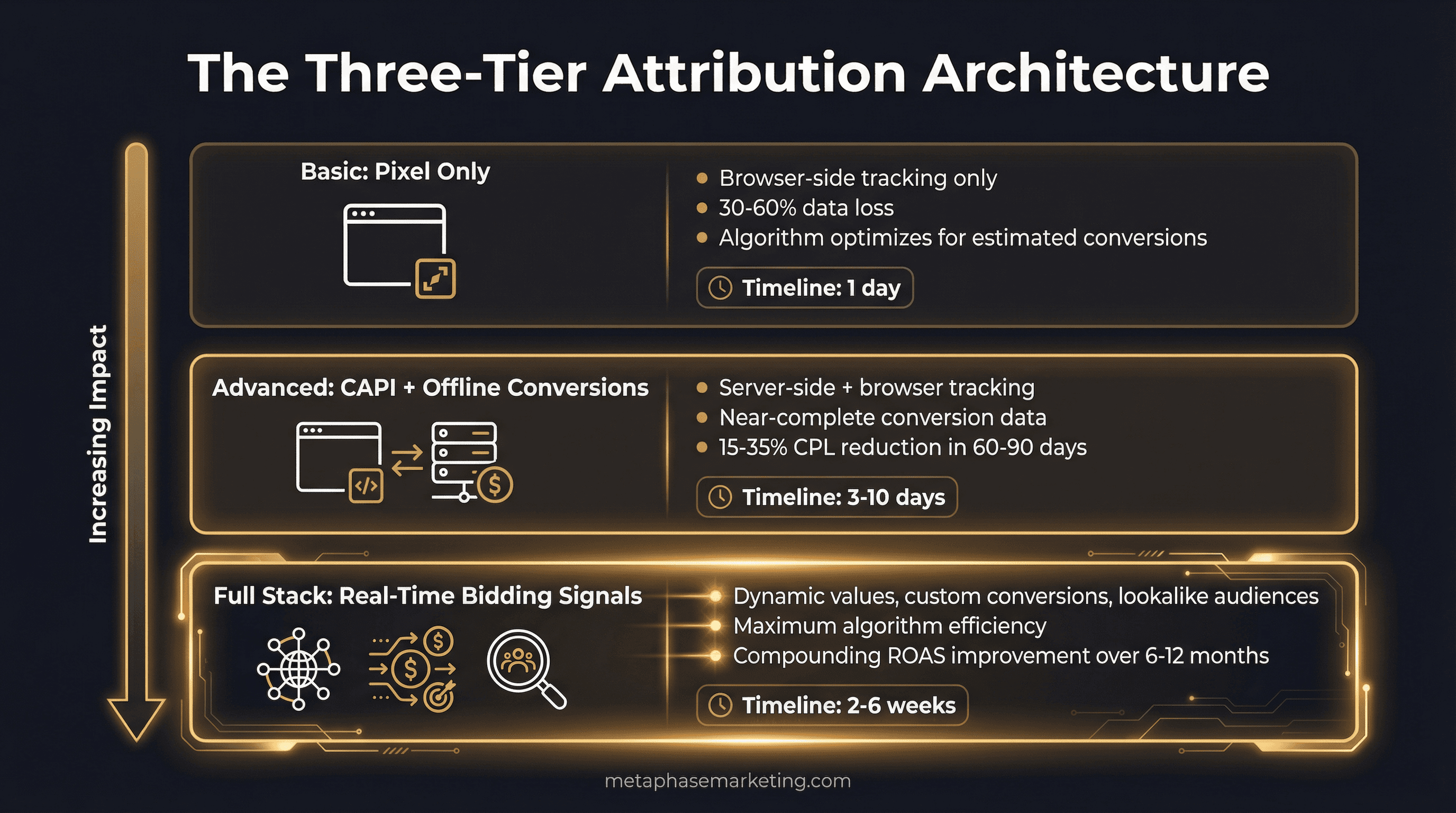
Every Metaphase engagement starts with an attribution audit that maps the gap between what your platforms are currently reporting and what is actually happening in your business. Then we close it in a sequenced implementation:
Tier 1 Audit , 1 Business Day
Full pixel health check, attribution gap analysis, GCLID capture assessment, CAPI setup review (if applicable), match quality score review, and a gap report showing estimated conversion loss by category. You will know exactly how large your attribution blind spot is and what it is costing you in bidding efficiency before we write a single line of code.
Tier 2 Implementation , 3–5 Business Days
GCLID capture on all landing page forms, Meta CAPI wiring for Lead and Purchase events, deduplication setup, first offline conversion import to Google Ads, match quality verified at 7+/10, and Enhanced Conversions enabled. This is Metaphase's standard delivery for clients who need a clean foundation quickly.
Tier 3 Full Stack , 2–6 Weeks
Everything in Tier 2 plus real-time webhook pipeline from booking software, POS, and CRM to CAPI. Dynamic conversion values passing actual revenue amounts. Custom conversions for micro-segment optimization. Lookalike audiences built from CAPI-verified buyer data. Cross-platform attribution dashboard showing Meta + Google + LinkedIn unified view. This is where clients who are scaling operate , and where the compounding gains become most dramatic.
Tier | Delivery Time | Key Deliverables | Expected Outcome |
|---|---|---|---|
Tier 1 Audit | 1 business day | Pixel audit, attribution gap report | Clear picture of what is being missed |
Tier 2 Implementation | 3–5 business days | CAPI wiring, GCLID capture, first offline import | 15–35% CPL improvement within 60–90 days |
Tier 3 Full Stack | 2–6 weeks | Webhook pipeline, dynamic values, attribution dashboard | 20–40% ROAS improvement, compounding gains |
The Infrastructure Is the Competitive Moat
Every competitor you face in paid search and paid social is running the same ad types to the same audiences. The creative, the targeting, the bid strategy , at scale, these converge. Every competent agency knows how to set up a campaign.
What separates accounts that consistently improve over time from accounts that plateau is the quality of the signal the algorithm is working with. An account with 12 months of clean offline data , real closed deals, actual revenue values, downstream CRM events , is a fundamentally different product than an account optimizing for form fills.
The accounts that build this infrastructure in months one through three spend months four through twelve watching their cost per acquisition drop while competitors' CPLs rise. That widening gap is not random. It is compounding signal quality operating at scale.
Most agencies do not build this because it takes technical depth they do not have and clients do not ask for. The clients who do have it consistently outperform those who do not , regardless of creative quality, budget level, or targeting sophistication. The attribution stack is the advantage that does not go away.
Ready to Connect Your Ad Spend to Actual Revenue?
Metaphase builds the attribution infrastructure that closes the loop between ad click and closed deal. We start every engagement with a gap analysis , showing you exactly what your platforms are missing and what it is costing you in bidding efficiency , before we build anything.










