

Metaphase Marketing
Google Ads, Call Tracking, Offline Conversions, Lead Generation, Dynamic Number Insertion
Call Tracking for Google Ads: Dynamic Number Insertion Setup Guide

For a large category of businesses , home services, healthcare, law firms, financial advisors, medical spas , the phone call is not a supplementary conversion channel. It is the primary one. A patient does not book a surgery consultation through a web form. A homeowner does not hire a roofer by clicking "Submit." They call.
This creates a fundamental problem for digital advertising. When someone clicks your Google Ad and then calls the phone number on your website, there is no page load to trigger a pixel, no form submission to record, and no event for Google Ads to attribute. The call , and whatever happened on it , is completely invisible to your campaign data.
Google Ads optimizes for what it can see. If it cannot see calls, it cannot learn from them. Smart Bidding treats call-driven campaigns as if the calls never happened, optimizing instead for form fills and other tracked micro-conversions that may have little correlation with actual revenue.
Dynamic Number Insertion (DNI) solves this. It is the technology that lets call tracking software like CallRail, WhatConverts, or Invoca show a unique phone number to each website visitor, associate that number with the visitor's specific Google Ads session, and report back to Google when a call occurs , including the original click that drove it.
This guide covers the full setup: how DNI works mechanically, how to wire it to Google Ads, and how to close the loop with offline call conversion imports for quality-based attribution.
Key Takeaways
Phone calls are invisible to Google Ads without call tracking. Dynamic Number Insertion (DNI) assigns a unique tracking number per session, linking every call back to its originating ad click.
CallRail integrates natively with Google Ads to import call conversions automatically. Basic call conversions are counted by call length , but the highest-value setup also imports CRM outcomes (qualified, closed) as separate conversion actions.
For Performance Max campaigns in particular, phone call data is critical. Without it, pMax has almost no signal from your primary conversion channel and will optimize toward lower-value touchpoints.
The most powerful configuration , CallRail or similar synced to your CRM , lets you import call quality outcomes back to Google Ads, so Smart Bidding learns which campaigns produce answered calls that close, not just calls that connect.
Set your call length threshold to match what qualifies as a real lead at your business. For complex services, 60–90 seconds is a common baseline.
The Phone Call Attribution Blind Spot
Browser-based tracking works by detecting events: a page load, a form submit, a button click. Phone calls produce none of these. When someone dials a number from your website or calls directly after seeing your ad, the transaction happens entirely outside the browser. No pixel fires. No event is recorded.
For businesses where 40–60% of inbound leads come by phone , a number that is typical for healthcare, legal, home services, and many local service categories , this means a majority of actual lead activity is invisible to Google's bidding algorithm.
The practical result: Smart Bidding optimizes around the form-fill conversions it can see, deprioritizing the keywords, audiences, and time slots that actually drive your best phone leads. Your campaign performance looks mediocre not because the ads are bad, but because the signal is incomplete.
What Dynamic Number Insertion Is and How It Works
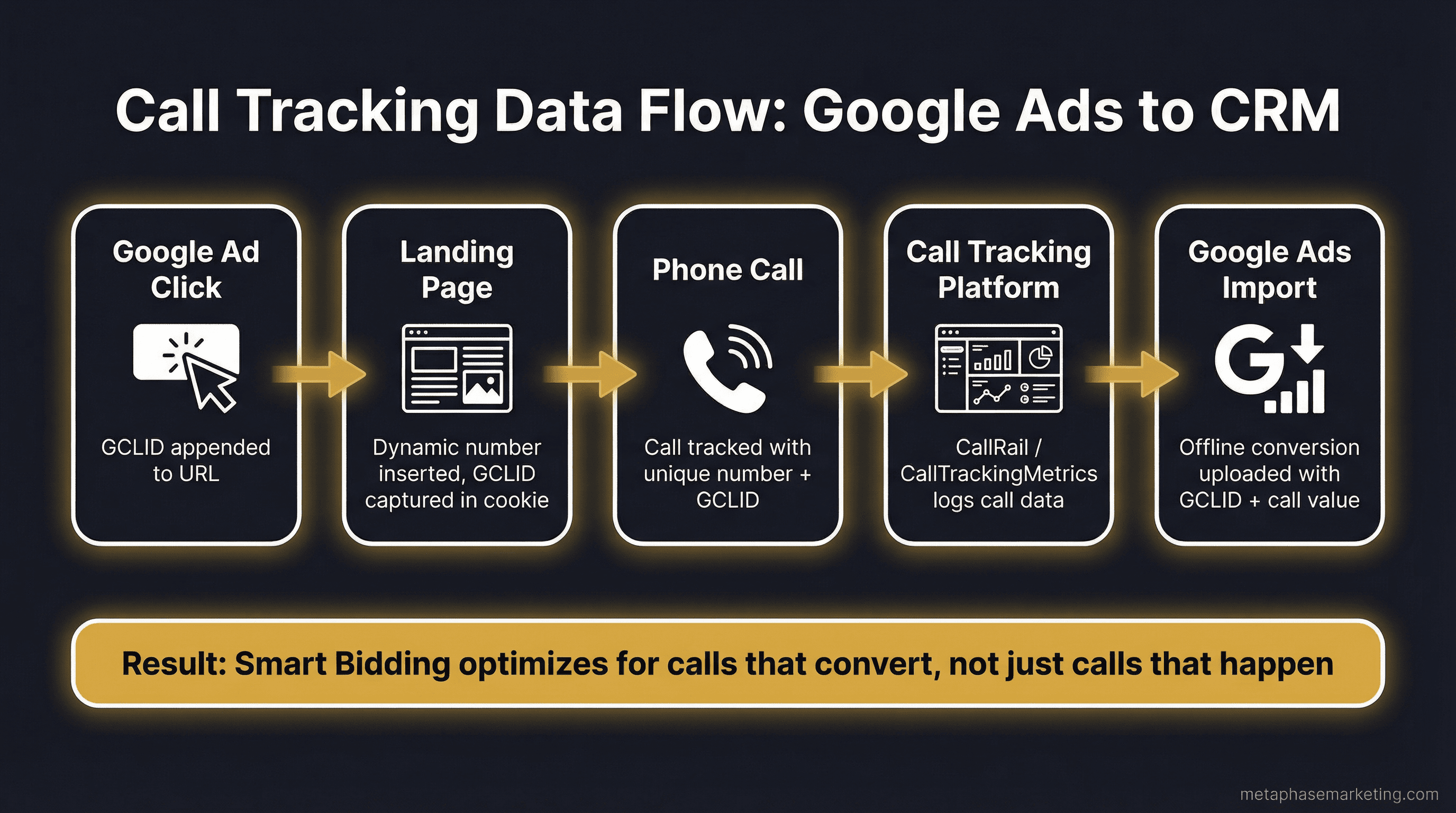
Dynamic Number Insertion is a technique where call tracking software automatically swaps the phone number displayed on your website for a unique tracking number when a visitor arrives. Each visitor session gets a distinct number from a pool. When the visitor calls that number, the call tracking software knows exactly which session produced the call , including the source, medium, campaign, and keyword that drove it.
Here is the mechanism:
You install a call tracking JavaScript snippet on your website (provided by CallRail, WhatConverts, or your platform of choice).
A visitor arrives from a Google Ad. The script reads the session source parameters (including the GCLID if present) and assigns a unique tracking number from your pool to display on the page.
The visitor calls that number. Your call tracking platform receives the call and logs it against the session that was assigned that number.
The GCLID associated with that session is now linked to a phone call. The call tracking platform reports this to Google Ads , either as a native integration event or via offline conversion import.
The key enabling factor is the GCLID. When Google Auto-tagging appends a click identifier to your URL, DNI software reads it from the session data and preserves it through to the call record. This is the thread that connects the call to the original ad click.
How DNI Connects to Google Ads
Most enterprise call tracking platforms can connect to Google Ads in two ways:
Native integration (calls as conversions): The platform sends a conversion event to Google Ads at the moment a qualifying call occurs. You define "qualifying" by call length , for example, any call over 60 seconds counts as a lead. This is fast and simple to set up, but it treats all qualifying calls equally regardless of outcome.
Offline import (calls with outcome data): The platform connects to your CRM. When a call is tagged as "Qualified Lead" or "Booked Appointment" or "Closed" inside your CRM, that outcome gets imported to Google Ads as a conversion event with a value. This is slower to set up but gives the algorithm revenue-quality signals instead of just call-length signals.
For most businesses, start with the native integration to get call data flowing immediately. Layer in CRM-synced outcome data once your call tagging workflow is consistent.
Setting Up CallRail: Step by Step
1. Create a Tracking Number Pool
In CallRail, create a tracking number pool , not a single tracking number. A pool assigns a unique number to each website visitor session simultaneously. If five visitors are on your site at the same time, each sees a different number.
Go to CallRail → Numbers → Create tracking number.
Select Number Pool (not single number).
Choose Source-level tracking: Google Ads to ensure GCLID capture is enabled automatically.
Set the destination (forward) number to your main business phone line.
Choose the number pool size. A good starting point: 10 numbers for up to 100 daily website sessions. Scale up if you have higher traffic.
Save the pool and note the JavaScript snippet CallRail provides.
2. Install the CallRail JavaScript Snippet
Install the CallRail snippet on every page of your website , ideally via Google Tag Manager, but also acceptable as a direct script in your site's <head> tag:
This script does the heavy lifting: it reads the visitor session source, selects a number from your pool to display, and handles the call tracking when the visitor dials. Your actual phone number in the site HTML is replaced dynamically at render time , visitors always see the tracking number, never the real number.
3. Connect CallRail to Google Ads
In CallRail, go to Settings → Integrations → Google Ads.
Connect your Google Ads account via OAuth.
Select the conversion action you created in Google Ads for call leads (or let CallRail create one).
CallRail will automatically report qualifying calls as conversions to Google Ads.
In Google Ads, verify the connection is working by checking Tools → Conversions for the call conversion action. The source should show as "CallRail" or the connected integration name. Match rate shows the percentage of calls that were linked back to a Google click.
Configuring Call Length Thresholds
Not every call is a lead. Someone who calls and hangs up immediately, or a 15-second call to verify your hours, should not count as a conversion. Set your length threshold to filter these out.
In CallRail: Settings → Reporting → Minimum call duration. Set this to a length that, in your experience, correlates with a real lead inquiry. Common thresholds by business type:
Home services (HVAC, roofing, plumbing): 60–90 seconds
Healthcare and medical: 90–120 seconds
Legal: 120–180 seconds
B2B services: 120+ seconds
When in doubt, pull a sample of your recent calls and listen to calls at different lengths. Identify the minimum duration that consistently represents a real inquiry, and use that as your threshold.
Setting Conversion Values
Calls that exceed your length threshold can be assigned either a fixed conversion value or a CRM-synced dynamic value:
Fixed value: Assign an estimated average lead value (for example, $250 for a qualified call in a home services business). This is fast to set up and works well when deal sizes are relatively consistent.
CRM-synced dynamic value: Connect CallRail to your CRM (HubSpot, Salesforce, or similar). When a call is tagged as a closed deal with an associated amount, import that as the conversion value. This is the most accurate approach and the one required for Target ROAS bidding to work with call data.
Why Phone Call Data Is Critical for Performance Max
Performance Max campaigns are increasingly the primary campaign type recommended by Google. They rely entirely on conversion signals to determine which placements, audiences, and creatives to serve. A Performance Max campaign without phone call conversion data is running with a significant portion of its primary signal missing.
If your business generates leads primarily by phone and your Performance Max campaign only sees form-fill conversions, the algorithm will optimize aggressively toward traffic that converts via form fill , which may be a fundamentally different audience than your phone-call converters. You end up buying two different types of traffic and measuring results against only one.
Feeding call conversions into Performance Max , with the same conversion action that drives bidding for your other campaign types , gives the algorithm a complete picture. It can then find the audiences and placements that drive phone leads specifically, not just the behavior pattern that looks like someone who fills out a form.
Advanced: CallRail + CRM Integration for Outcome-Based Attribution
The highest-value configuration takes the native integration one step further: syncing call outcomes from your CRM back to Google Ads as separate conversion events.
Here is how it works:
A call comes in via CallRail. The call record is created and linked to the Google Ads session.
Your sales team completes the call and tags the outcome in CallRail or syncs it from your CRM: "Qualified," "Booked Appointment," "Not Interested."
When a call is tagged "Qualified" or "Booked," CallRail (or a webhook from your CRM) fires a second conversion event to Google Ads , a higher-value conversion action called "Qualified Phone Lead" with a higher conversion value than the basic "Phone Call" event.
The result: Google Ads learns the difference between a call that connected and a call that produced a real opportunity. Smart Bidding shifts toward the ad placements, time slots, and keywords that drive qualified phone leads specifically , a much more useful signal than raw call volume.
Alternative Call Tracking Platforms
CallRail is the most widely used platform for small-to-mid-size businesses, but it is not the only option. Here is when each alternative makes sense:
Platform | Best For | Standout Feature |
|---|---|---|
CallRail | SMBs to mid-market | Easy setup, strong Google Ads native integration, form tracking included |
WhatConverts | Agencies managing multiple clients | Multi-client dashboards, captures calls + forms + chats in one view |
Invoca | Enterprise, financial services, insurance | AI-powered call analysis, real-time bidding signals during the call |
CallTrackingMetrics | Mid-market with complex routing | Advanced IVR, call routing, deep CRM integrations |
For most Google Ads clients running local or regional campaigns, CallRail is the right starting point. Consider Invoca when you are running high-spend campaigns where the cost of the enterprise platform is justified by the improvement in bidding signal quality.
Quality Checklist Before Going Live
Auto-tagging is enabled in Google Ads account settings
CallRail number pool is configured and JavaScript snippet is installed on all landing pages
Google Ads integration is connected and conversion action is visible in Google Ads
Call length threshold is set and reflects your actual lead qualification standard
Test call completed , verified that a test call appears in CallRail reporting and passes to Google Ads conversions
Conversion value is set (fixed or dynamic from CRM)
If using CRM outcome-based attribution: webhook is configured and test webhook fires correctly
Performance Max campaigns are updated to include the call conversion action in bidding objectives
Expected Impact on CPL and ROAS
The impact of adding call tracking to Google Ads campaigns varies significantly by business type and the share of calls in total lead volume, but typical results follow a consistent pattern:
Conversion volume: Accounts that previously tracked only form fills typically see reported conversions increase 30–60% when call conversions are added , because calls were always happening, they just were not counted.
CPL: Drops 15–30% within 60 days as Smart Bidding gets a more complete picture of what drives actual leads and can stop buying traffic that only produces forms.
ROAS: Improves most when dynamic call outcome values are imported, because the algorithm can distinguish between campaigns that produce high-value calls and those that produce low-quality call volume.
For businesses where phone calls are the primary revenue driver, call tracking is not an optional add-on. It is the foundation that everything else in your attribution stack builds on.
Running Google Ads Without Call Tracking?
If phone calls are a significant part of your lead volume, your current campaigns are running with a major blind spot. Metaphase sets up complete call tracking and offline attribution infrastructure , from DNI configuration through CRM-synced quality imports.










